Agentic Browsing & llms.txt: Is Your Website Ready for AI Agents?
Since Lighthouse 13.3, Google's Agentic Browsing category checks whether your site is ready for AI agents. What the audit checks and how to set up llms.txt correctly.
Since 7 May 2026, Google has been checking something new about your website. Lighthouse 13.3, the audit tool behind Chrome DevTools and PageSpeed Insights, added a category next to Performance, SEO and Best Practices: Agentic Browsing. It does not measure how your page looks to humans. It measures how well AI agents can work with it.
This is not a gimmick for large tech companies. AI agents like Perplexity Comet, OpenAI Atlas and the Claude browser extension now browse the web on behalf of users: they research, compare providers, fill in forms and complete purchases. If your website is hard for these agents to read, it drops out of their recommendations. This article shows you exactly what the audit checks, how to run it yourself, how to set up a correct llms.txt and why there is a real contradiction at Google that you should know about.
In short
- What: Lighthouse 13.3 (7 May 2026) checks how agent-readable your site is, via the "Agentic Browsing" category. Four areas: llms.txt, WebMCP, accessibility tree and layout stability (CLS).
- Score: not a 0-to-100 grade, but a pass ratio (for example, 2 of 4 passed).
- llms.txt: a Markdown file at the root of your domain. It passes the check when it has an H1, at least 50 characters and at least one Markdown link.
- The catch: Google Search itself says llms.txt is not a ranking signal. The Chrome team checks it anyway. Both are true, because they are about two different things.
- For SMBs: a clean llms.txt and semantic HTML take about an hour and put you ahead of competitors before it becomes standard.
Agentic traffic grew by 7,851 % in one year
year on year (HUMAN Security)
in their buying journey
visitors arriving via AI services
What is Agentic Browsing, and why is Google checking it now?
An AI agent reads a website differently from a human. It does not see layout, colours or images in the usual sense. It works with structure: the accessibility tree, the heading hierarchy, the labels on buttons and form fields. This is the same data a screen reader uses for blind users. When that structure is clean, the agent can act reliably. When it is chaotic, the agent guesses or gives up.
With Lighthouse 13.3, Google moved the Agentic Browsing category out of experimental status and into the default configuration. In Chrome 150 and later it appears in DevTools without any setup, and since late May 2026 PageSpeed Insights at pagespeed.web.dev returns the same results. The category is, per Chrome's documentation, explicitly "under development" and based on proposed standards. For that reason it deliberately gives no 0-to-100 grade, but a pass ratio: how many of the individual checks pass.
The timing is simple to explain. Automated, agentic access to websites rose by 7,851 percent over the past year, according to the State of Agentic Traffic report by HUMAN Security (April 2026). Google is preparing the web for a future in which a meaningful share of visitors are not people, but agents working for people.
Run the test yourself: step by step
You do not need to buy a tool or hire a developer. There are three ways to check your website right now.
Option 1: Chrome DevTools (Chrome 150+). Open the page you want to test. Press F12 for DevTools, switch to the "Lighthouse" tab (it may be hidden behind the arrow icon), make sure the "Agentic Browsing" category is ticked, and click "Analyse page load". After the run, find the Agentic Browsing section in the report with its pass ratio and individual checks.
Option 2: PageSpeed Insights (no Chrome update needed). If you do not have Chrome 150, open pagespeed.web.dev, enter your URL and start the analysis. The Agentic Browsing section is further down in the result. This is the simplest route if you do not want to install anything.
Option 3: Lighthouse via the command line (for developers). With Node.js you install Lighthouse via npm and run it against your URL. From version 13.3 the category is included in the default configuration. Useful if you want the check inside a deployment pipeline.
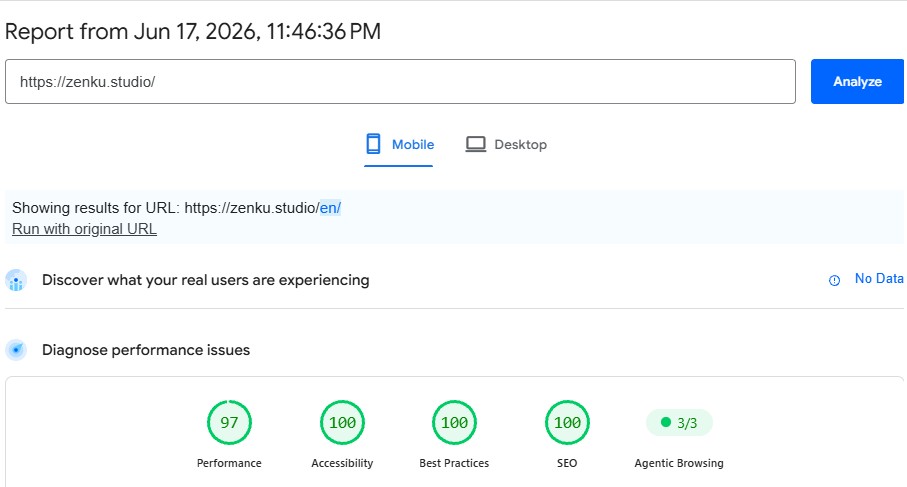
The pass ratio shows how many of the applicable checks pass. zenku.studio sits at 3 of 3 in the screenshot above, since the site has a clean llms.txt. Many SMB websites without that file start at 1 of 2, because the llms.txt is missing and almost nobody implements WebMCP yet. That gap is the opportunity: the deficit is closed in about an hour.
The four audit areas in detail
The category groups its checks into four areas. Here is what each one requires and how you pass it.
| Audit area | What is checked | How to pass |
|---|---|---|
| llms.txt | Machine-readable summary at the domain root | File at /llms.txt with an H1, at least 50 characters and at least one Markdown link |
| Accessibility tree | Names, labels, tree integrity, visibility of interactive elements | Every button and form field has a programmatic name, clean ARIA roles |
| Layout stability | Cumulative Layout Shift (CLS) | CLS below 0.1, no layout jumping during load |
| WebMCP | Structured tools that agents can call directly | Still experimental in 2026. A failure here is explicitly fine, per Google |
1. llms.txt: the machine-readable summary
Lighthouse checks three things about your llms.txt. First, the file must contain a Markdown H1, a line starting with a hash and the name of your website. Second, it must be at least 50 characters long. Third, it must contain at least one real Markdown link in the square-brackets-text, round-brackets-URL format. A bare URL does not count.
Important for scoring: if the file is missing entirely (HTTP 404), Lighthouse marks this as "not applicable", not as a failure. If your server returns a real error instead (HTTP 5xx), the check counts as failed. If the file breaks one of the three format rules, you get the note "does not follow recommendations". The next section shows you how to build the file correctly, with a full template.
2. Accessibility tree: the same basis as screen readers
AI agents use the accessibility tree as their primary model for understanding a page. Lighthouse filters out a subset of its existing accessibility checks that are critical for machine interaction: does every button, link and input field have a programmatic name? Are the ARIA roles correct and the tree cleanly nested? Are interactive elements visible and focusable?
The good news: if your website already passes the standard Lighthouse accessibility audits well, you will very likely pass this area. These are not new requirements, but familiar accessibility fundamentals reframed for agents. Doing this well helps blind users and AI agents at the same time. This structural cleanliness is also part of any proper technical SEO audit.
3. Layout stability: why jumping pages confuse agents
You know Cumulative Layout Shift from the Core Web Vitals. It reappears here because agents that take screenshots to orient themselves get confused by a layout that jumps around while loading. The threshold is the same as in the Core Web Vitals: a CLS below 0.1 counts as good. If you already have your loading performance under control, this point is handled too.
4. WebMCP: the protocol of the future
WebMCP stands for Web Model Context Protocol, an experimental, browser-native interface that Google and Microsoft presented in February 2026 and published as a draft in the W3C community. The idea: a website exposes its actions, such as search, booking or add-to-cart, as structured tools that an agent can call directly, instead of laboriously interpreting screenshots.
There are two ways to implement it: declaratively via HTML attributes on forms (attributes that start with data-webmcp) or imperatively via a JavaScript method (navigator.modelContext.registerTool). Almost none of this is widespread in 2026. WebMCP runs in the Chrome 149 origin trial and is being tested by names like Booking.com, Expedia and Shopify. The Lighthouse documentation itself says this check fails on almost every site today and that this is fine. So you do not need to do anything here right now, but you should know where this is heading.
Creating an llms.txt: a complete guide with a template
The llms.txt standard was proposed in September 2024 by Jeremy Howard. The idea behind it: a language model's context window is too small to take in a whole website. You, as the operator, know best which information matters. The llms.txt is your curated summary, placed at yourdomain.com/llms.txt.
The specification is lean. Only the H1 with the name of the website is mandatory. Recommended are a blockquote with a short description and H2 sections with link lists to your most important pages. Here is a complete, spec-conformant file for a small joinery business:
# Hartley Joinery

> Family-run joinery and carpentry workshop in Bristol, UK. Bespoke fitted furniture - wardrobes, kitchens, home offices and alcove shelving - for homes across the South West. Everything built to measure, by appointment.

Hartley Joinery designs and installs custom furniture for residential clients. Service area: Bristol and the surrounding region.

## Services

- [Fitted Wardrobes](https://hartleyjoinery.co.uk/wardrobes): Bespoke sliding and hinged wardrobes, made to measure
- [Fitted Kitchens](https://hartleyjoinery.co.uk/kitchens): Custom kitchen design, cabinetry and worktops
- [Home Offices](https://hartleyjoinery.co.uk/home-offices): Built-in desks, shelving and storage

## About and contact

- [About us](https://hartleyjoinery.co.uk/about): Family workshop, trading since 1978
- [Contact](https://hartleyjoinery.co.uk/contact): Enquiry, phone, directions, free home visit

## Optional

- [Portfolio](https://hartleyjoinery.co.uk/portfolio): Photos of completed projects
- [Blog](https://hartleyjoinery.co.uk/blog): Material care and interior ideas
The rules in detail: the H1 at the very top is mandatory. The blockquote, introduced by a greater-than sign, is the short summary for the model. The H2 sections group links in the format text in square brackets, URL in round brackets, then optionally a colon and a short note. A section with the reserved name "Optional" holds links a model may skip when context is tight. Place the file in the root directory so it is reachable at yourdomain.com/llms.txt.
On WordPress you add the file most easily via a small snippet or an SEO plugin that serves custom files from the root. On static sites or Astro you drop it into the public folder. You can see a live example at zenku.studio/llms.txt, built to exactly these rules. After uploading, validate the result with the Lighthouse audit or simply open the URL in your browser.
The Google contradiction: not a ranking signal, checked anyway
Here is the point that confuses most people, and that no other guide resolves cleanly. Google Search says clearly that llms.txt plays no role in search. John Mueller of the Search Relations team compared the file to the old keywords meta tag that search engines ignore, and said in effect that it is not evaluated for search. Gary Illyes added that Google does not support llms.txt and has no plans to.
At the same time, Lighthouse, also a Google product, actively checks the file. How does that fit together? These are two different teams with two different goals. The Search team is talking about rankings and AI Overviews in Google Search, where llms.txt does not count. The Chrome team optimises for browser-based AI agents that get tasks done, and there the file helps. Both statements are true at once. Search Engine Land documented this inconsistency and reached the same conclusion: the audits target agents and browser tools, not Google rankings.
The practical takeaway for you: do not set up an llms.txt expecting better Google rankings. It will not give you those. Set it up because AI agents and AI search services understand your site better with it and are more likely to cite you as a source. This is the same logic as optimising for AI answers, which we cover in detail in our article on GAIO and AI search. Both topics are part of a modern SEO strategy for SMBs that thinks beyond classic rankings.
How serious is this? The agentic traffic numbers
The scepticism is fair: is the effort worth it for something almost nobody uses today? The growth numbers are blunt. Agentic traffic rose by 7,851 percent within a year. The largest share comes from agentic browsers: Perplexity Comet sits at around 48 percent of observed agent activity, OpenAI Atlas at 21 percent, the Claude browser extension at 17 percent.
For shopping the trend is even clearer. According to Salesforce, 45 percent of consumers use AI for at least part of their buying decision. McKinsey finds that visitors arriving via AI services are 38 percent more ready to buy than those from classic channels. ChatGPT reports around 50 million shopping queries per day, and AI-driven retail spending in 2026 is estimated at roughly 20.9 billion dollars.
Today, agentic traffic is still a small share for most websites. But the curve is steep, and the preparation effort is small. Whoever builds a clean foundation now is ready before the competition even notices that something has shifted.
Checklist by website type: what do you actually need to do?
Not every website needs the same thing. Here are the concrete priorities by business type.
Local service business (trades, practice, law firm): set up an llms.txt with your services, your service area and your contact page. Make sure your contact details and opening hours are clean text, not just an image. That covers almost the entire relevant benefit for your business.
Online shop (WooCommerce, Shopify): llms.txt with categories and key info pages (shipping, returns, contact). Product pages need clean, labelled buttons (add to cart, variant selection) and a stable layout without jumps. WebMCP becomes most important here over time, because agents will increasingly trigger purchases directly.
B2B service or SaaS: llms.txt with services, references and contact. Put weight on well-structured content embedded in the reading flow, because agents cite you as a source when your page covers a topic clearly and completely. This connects directly with a deliberate content cluster strategy.
What all three need: semantic HTML, programmatic names for all interactive elements and a CLS below 0.1. These are not exotic requirements, but solid web craft that also improves your accessibility and your Core Web Vitals along the way.
Common mistakes in the Agentic Browsing audit
Four pitfalls come up again and again. First: an llms.txt with no H1, no link or under 50 characters. It exists, but does not pass the check. Second: a server error when fetching the file, for example through a faulty redirect. Lighthouse counts this as a real failure, worse than a missing file. Third: a high CLS from late-loading banners, ad slots or fonts. Fourth: buttons and form fields with no recognisable name, often with icon-only buttons or custom dropdowns.
Frequently asked questions
Do I need Chrome 150 to run the test?
No. In Chrome 150 and later the category appears automatically in DevTools. If you have an older version, just use PageSpeed Insights at pagespeed.web.dev, where the check has also been available since late May 2026, with no update needed.
Does an llms.txt improve my Google ranking?
No. Google Search does not evaluate the file for rankings, which Google has confirmed several times. The benefit is with AI agents and AI search services, which understand your site better with it, and with passing the Lighthouse audit.
Is a missing llms.txt a problem?
In the audit a missing file counts as "not applicable", not as a failure. A server error on fetch does count against you. Since the file is created in about an hour and agentic traffic is growing fast, setting it up is still worth it.
Do I need to implement WebMCP now?
Not in 2026. The technology is experimental, and Google itself says a failure on this check is currently normal. Focus on llms.txt, accessibility and layout stability. WebMCP becomes relevant once Chrome 150 is widely available.
Is your website ready for AI agents?
We run the Agentic Browsing audit on your site, set up a spec-conformant llms.txt and bring accessibility and loading performance up to standard. Clear findings, fixed cost.
Free initial consultation →